How to reset or initialize the Wireless Headphones (WH-1000XM6)
IMPORTANT: This article applies only to specific products and/or operating systems. Check the Applicable Products and Categories section of this article before starting these steps.
Reset the headset
-
Connect the headset to an AC outlet.
Plug the supplied USB Type-C cable and a commercially available USB AC adaptor (A).

-
Press and hold the
 (power) button (B) and the NC/AMB (noise canceling/Ambient Sound Mode) button (C) for about 5 seconds.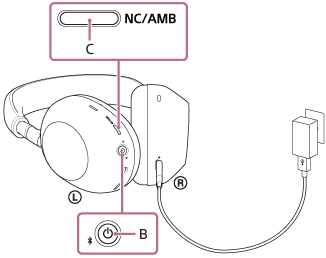
The headset will be reset (the charging indicator turns off and then lights up again).
NOTES:
- During a reset, the device registration (pairing) information and other settings are retained.
- If the headset does not operate correctly even after a reset, initialize the headset to restore the factory settings.
Initialize the headset to restore factory settings
IMPORTANT: This operation resets all the device settings to the factory defaults and deletes all pairing information.
NOTE: After initializing the headset, you should also delete the headset pairing information from any connected devices and then pair them again.
-
Turn off the headset.
Remove the USB Type-C cable.
-
Press and hold the
(power) button (A) and the NC/AMB (noise canceling/Ambient Sound Mode) button (B) for about 10 seconds.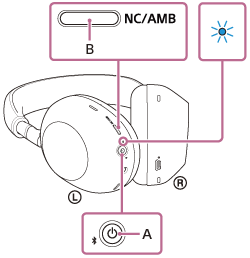
When the initializing is complete, the indicator (Blue) flashes 4 times. -
Delete the headset from the list of Bluetooth products on your device.
-
Pair the headset to your selected device again
NOTES:
- If you have updated the software after purchasing the headset, the software is retained updated even if you initialize the headset.
- When you initialize the headset to restore to the factory settings after you change the language of the voice guidance, the language will not return to the factory settings.
Warranty Information
For information on Sony warranties
Contact support
Contact your Sony Support team
Support by Sony (Mobile App)
Never miss an update again! Find information and receive instant notifications about your product.


Repair Services
Learn self-fix information and check service centre locations here.